
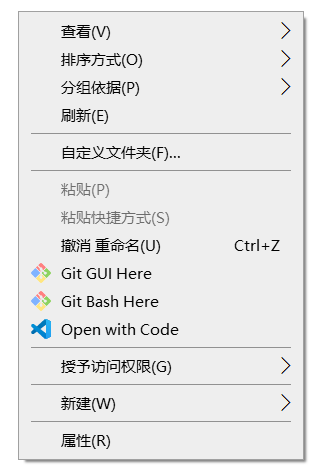
 vscode添加到右键菜单
# 创建REG文件
在桌面创建文件vs.reg,并写入如下代码:
Windows Registry Editor Version 5.00


[HKEY_CLASSES_ROOT\*\shell\VSCode]

@="Open with Code"

"Icon"="D:\\Microsoft VS Code\\Code.exe"


[HKEY_CLASSES_ROOT\*\shell\VSCode\command]

@="\"D:\\Microsoft VS Code\\Code.exe\" \"%1\""


Windows Registry Editor Version 5.00


[HKEY_CLASSES_ROOT\Directory\shell\VSCode]

@="Open with Code"

"Icon"="D:\\Microsoft VS Code\\Code.exe"


[HKEY_CLASSES_ROOT\Directory\shell\VSCode\command]

@="\"D:\\Microsoft VS Code\\Code.exe\" \"%V\""


Windows Registry Editor Version 5.00


[HKEY_CLASSES_ROOT\Directory\Background\shell\VSCode]

@="Open with Code"

"Icon"="D:\\Microsoft VS Code\\Code.exe"


[HKEY_CLASSES_ROOT\Directory\Background\shell\VSCode\command]

@="\"D:\\Microsoft VS Code\\Code.exe\" \"%V\""
1
2
3
4
5
6
7
8
9
10
11
12
13
14
15
16
17
18
19
20
21
22
23
24
25
26
27
28
29
30
31
32
33
34
35
36
37
38
39
40
41
42
43
44
45
46
47
48
49
50
51
52
2
3
4
5
6
7
8
9
10
11
12
13
14
15
16
17
18
19
20
21
22
23
24
25
26
27
28
29
30
31
32
33
34
35
36
37
38
39
40
41
42
43
44
45
46
47
48
49
50
51
52
注意
注意D:\\Microsoft VS Code\\Code.exe为电脑上vscode的启动文件路径
修改完成后双击即可
编辑 (opens new window)
上次更新: 2023/10/13, 17:39:25